What dispatch & scheduling gives your business
Drag-and-Drop Dispatch Board
A visual board with time slots, technician columns, and color-coded job status. Reassign a job by dragging it to a different tech or time slot. See the entire day's schedule at a glance.
Real-Time GPS Tracking
See where every technician is on a live map. Track arrival times, time-on-site duration, and route efficiency. Customers can see their tech's location on an ETA page.
AI-Optimized Routing
Smart routing considers technician location, drive distance, skill match, and job priority to sequence the day's work. The result: less drive time, more jobs completed, lower fuel costs.
Automated Customer Notifications
Customers receive SMS and email notifications when a tech is assigned, en route, and arriving. 'On my way' messages include an ETA and the tech's name, reducing support calls by 80%.
Skill-Based Assignment
Tag technicians with certifications, specializations, and equipment. The dispatch system prevents assigning a junior tech to a job that requires a master electrician or specific parts.
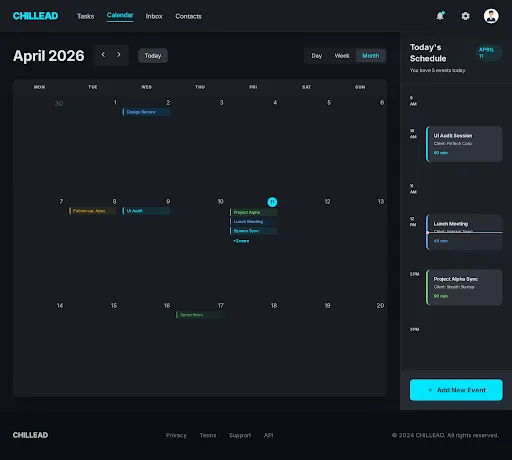
Unified Team Calendar
Every scheduled job, estimate, and follow-up task lands on one live calendar view your whole team shares - no more checking three different tools to see what's happening today.
Emergency Priority Handling
Mark incoming jobs as emergencies. The system identifies the closest qualified, available tech and suggests schedule rearrangements to accommodate the urgent call with minimal disruption.
Get started in four steps
Add Your Team
Input your technicians with their skills, certifications, service areas, and working hours. This takes about 10 minutes.
Create Job Types
Define your service categories with estimated durations, required skills, and default pricing. Chillead uses these to optimize assignment.
Dispatch From the Board
New jobs appear in the queue. Drag them to a technician's timeline or let AI suggest the optimal assignment based on location, skills, and availability.
Track in Real Time
Watch job progress live - en route, arrived, in progress, completed. Customers get automatic notifications at each stage.
The Real Cost of Manual Dispatch
Manual dispatch - where a coordinator looks at a whiteboard or spreadsheet and assigns jobs based on gut feel - creates three categories of waste that most businesses never quantify.
Geographic waste: sending a tech from the north side to the south side, then back to the north. This adds 30-45 minutes of drive time that generates zero revenue.
Skill mismatch waste: sending a junior tech to a complex job. The tech can't complete it, drives to the next job, and a senior tech has to go back tomorrow. You pay for two truck rolls instead of one.
Gap waste: 30-45 minute windows between jobs where the tech sits in their truck waiting. Across a team of 5, that's 2-4 hours of paid labor producing nothing.
Chillead's dispatch eliminates all three. Route optimization handles geographic waste. Skill-matching prevents mismatch waste. Dynamic schedule optimization fills gaps automatically when cancellations or early completions create openings.
Dispatch Connected to CRM and Invoicing
In most service businesses, dispatch is disconnected from everything else. The dispatcher uses one tool, the sales team uses the CRM, and the office manager uses accounting software. Data gets re-entered, context gets lost, and mistakes happen.
Chillead connects dispatch to the entire business workflow. Convert a CRM deal to a dispatch job with one click - customer info, job notes, estimated value, and equipment history carry over automatically. When the tech completes the job, the invoice is generated from job data - line items, labor time, and materials are pre-filled. The contact record in the CRM updates with the job completion, and a review request is triggered.
One workflow. No re-entry. No switching tools.
See dispatch & scheduling in action
Watch a quick walkthrough of how real service businesses use this every day.
Book a Live Demo →“Our techs used to waste 40 minutes a day on routing. Now dispatch handles it in seconds.”
Carlos M.
Operations Manager, BrightPath Electric
What the competition can't match
Jobber and HouseCall Pro have basic dispatch, but without a connected CRM pipeline or built-in dialer. GoHighLevel has no dispatch at all. ServiceTitan's dispatch is powerful but costs $245+/mo with mandatory multi-thousand dollar onboarding. Chillead connects dispatch to CRM, dialer, and invoicing in one system starting at 49/mo.
Common questions about Dispatch & Scheduling
Go deeper on dispatch & scheduling
Best Dispatch Software for Plumbing Companies in 2026
We compared 5 dispatch platforms for plumbing businesses on emergency routing, pricing, mobile tech features, and integr...
ComparisonsDispatch Software Comparison: 6 Tools for Field Service Teams (2026)
We compared Jobber, HouseCall Pro, ServiceTitan, Workiz, FieldPulse, and Chillead on dispatch features. Here are the hon...
GuidesDispatch Optimization for Service Businesses: From 3 Jobs/Day to 7 Jobs/Day Per Tech
Most service businesses lose 35-45% of their technician's day to driving. Here's how AI-powered dispatch optimization do...
See dispatch & scheduling with AI built in.
Start free and experience the intelligence yourself. No credit card required.
Free trial · No credit card · Cancel anytime