The app your techs will actually use.
Click below to explore the mobile-first field tech experience. Swipe through jobs, start timers, complete checklists, and generate invoices - all from one screen.
No credit card to try it. Plans start at $49/mo/mo.
Book a live demo →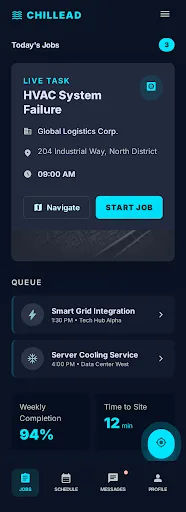
What field tech app gives your business
Complete Job Details at a Glance
Customer name, address, phone, job type, special instructions, equipment history, and previous service notes - all on one screen. Your tech never needs to call the office for context.
Digital Checklists
Customizable checklists per job type. Safety inspections, installation steps, quality checks - techs check items off, add notes, and capture photos. Compliance and quality control are built into the workflow.
Before/After Photo Capture
Tap to capture photos directly in the app. Images are automatically tagged with the job, timestamped, GPS-stamped, and attached to the customer record. Perfect for proof of work and dispute resolution.
On-Site Estimates & Quotes
Build and send professional quotes from the field with parts lookup, labor rate calculations, and tiered options. Customers approve with a digital signature on your tech's screen.
On-Site Invoicing & Payments
Generate invoices from completed job data and collect credit card payments before leaving the property. No more chasing payments days or weeks later.
Equipment & Asset Tracking
Log every unit installed at a property - model number, serial number, install date, and warranty expiration - right from the field. Techs arrive knowing exactly what's on site, and the records drive maintenance reminders and replacement recommendations.
GPS Navigation & Status Updates
One-tap navigation to the next job. Status updates (en route, arrived, started, completed) notify the office and customer automatically. No phone calls needed to coordinate.
Get started in four steps
Tech Opens the App
The daily schedule loads automatically showing all assigned jobs with addresses, times, and customer details.
Navigate to the Job
Tap the job, tap 'Navigate' for turn-by-turn directions. Status updates to 'en route' automatically - customer gets a notification.
Complete the Work
Follow the digital checklist, capture photos, log notes. Mark the job complete with one tap.
Invoice & Collect
Generate the invoice from job data, send to the customer, and collect payment on-site. Done before driving to the next job.
Designed by Talking to Technicians, Not Office Managers
Most field service apps are designed by people who have never crawled under a house or climbed onto a roof in August. The interfaces are cluttered with features technicians don't need, while the features they do need are buried three menus deep.
Chillead's tech app was built by interviewing real field technicians across HVAC, plumbing, electrical, and cleaning companies. The result is an app optimized for the conditions techs actually work in:
- Large touch targets for gloved hands
- High-contrast mode for outdoor visibility
- One-tap status updates (no multi-field forms)
- Offline-capable core functions for basements and remote areas
- Camera integration that doesn't require switching apps
The goal is simple: your techs should be able to use every feature without reading a manual or sitting through training.
Turn Every Job Into Actionable Data
Without a field tech app, 90% of what your technicians see, learn, and do in the field is lost. They notice the customer has aging equipment that should be replaced. They see opportunities for additional services. They learn about the customer's preferences and concerns.
With Chillead's field app, every interaction generates structured data:
- Job duration tracked automatically for accurate labor billing
- Checklists verified with digital timestamps and GPS coordinates
- Equipment data (model numbers, installation dates, serial numbers) captured on-site
- Customer conversations logged with notes and voice memos
- Photos organized by job and category
This data feeds your CRM, drives maintenance contract renewals, enables predictive service recommendations, and gives your office team full visibility into field operations.
See field tech app in action
Watch a quick walkthrough of how real service businesses use this every day.
Book a Live Demo →“My guys actually like using this app. That is a first. The checklists keep them consistent on every job.”
Tom B.
Field Supervisor, CoolAir Systems
What the competition can't match
GoHighLevel has no field tech app. ServiceTitan's mobile app requires expensive multi-week onboarding. Jobber's app lacks a connected CRM pipeline and dialer. Chillead's tech app is included from the Growth plan ($99/mo) with zero training needed - it's designed for technicians, not office managers.
Common questions about Field Tech App
Go deeper on field tech app
Best Field Service Software for Electrical Contractors in 2026
Electrical contractors have unique needs: permit tracking, project-based billing, and inspection coordination. We ranked...
GuidesField Service Operations Guide: From Chaos to Clockwork (2026)
The complete playbook for building a field service operation that scales. Covers dispatch optimization, technician routi...
GuidesField Service Automation in 2026: The Definitive Guide for Service Business Owners
87% of organizations report AI has positively impacted revenue. Here's the complete automation playbook for HVAC, plumbi...
See field tech app with AI built in.
Start free and experience the intelligence yourself. No credit card required.
Free trial · No credit card · Cancel anytime